

In 2026, our smartphones are no longer just communication devices; they are digital wallets, health monitors, and mobile offices. The Samsung Galaxy S26 Ultra features one of the most advanced Dynamic AMOLED 3X displays. It is capable of incredible brightness. The display also offers remarkable color accuracy. However, that vibrant, edge-to-edge screen has a significant downside: it acts as a beacon for prying eyes. Whether you are reviewing confidential work documents on the train, you face a real security threat. Entering a banking PIN in a coffee shop also exposes you to this risk. “Visual hacking” is a risk that cannot be ignored.
Finding the best privacy screen protector for Galaxy S26 Ultra requires careful consideration. It’s not as simple as buying the first piece of darkened glass you see on Amazon. You need to consider several factors. The S26 Ultra utilizes Samsung’s 3rd Generation Ultrasonic Fingerprint Sensor. This technology uses sound waves to map the ridges of your print. Cheap privacy filters are often too thick. They use low-quality adhesives that absorb these sound waves. This absorption renders your biometric security useless. Furthermore, poor-quality privacy glass can create a “pixel grid” effect that ruins the clarity of your high-resolution display.
In this comprehensive guide, we have put the top contenders through rigorous testing. We analyzed viewing angles, light transmission, scratch resistance, and—most importantly—biometric compatibility. Our goal is to help you find a protector that secures your data without compromising the Galaxy S26 Ultra premium experience.
🟢 QUICK COMPARISON: TOP CONTENDERS
MASTER COMPARISON (OVERALL)
Best for: A quick overview of the top options.
| Brand | Best For… | Price Tier | Overall Rating | Buy Now |
| HKKAIS | Fingerprint Accuracy | $ (Low) | ⭐ 4.5/5 | Check Price |
| JETech | Most Users (Easy Install) | $ (Low) | ⭐ 4.6/5 | Check Price |
| Newspoint | Ultrasonic Fingerprint | $ (Low) | ⭐ 4.4/5 | Check Price |
| DIACUBE | Eye Protection / Matte | $$ (Mid) | ⭐ 3.9/5 | Check Price |
| ELEYBTEH | Maximum Privacy Coverage | $ (Low) | ⭐ 4.0/5 | Check Price |
PRIVACY & DISPLAY PERFORMANCE
Best for: Users asking “Which screen protector has the best privacy angle?”
| Brand | Privacy Type | Viewing Angle | Screen Clarity | Brightness Impact |
| HKKAIS | 2-Way (Side) | ≈30° | High (HD Glass) | Low–Medium |
| JETech | 2-Way (Side) | ≈28–30° | High | Low (~15%) |
| Newspoint | 2-Way (Side) | ≈30° | High (TPU) | Low–Medium |
| DIACUBE | Matte / Anti-Glare | No Blackout | Matte (Soft) | Medium |
| ELEYBTEH | 2-Way (Side) | ≈28° | Medium | Medium |
- Note: 2-Way protects you from people sitting next to you. 4-Way protects you from people standing over you, but makes the screen darker.
FINGERPRINT SENSOR COMPATIBILITY
Best for: Users asking “Does privacy glass work with Galaxy S26 Ultra fingerprint?”
| Brand | Success Rate | Re-Scan? | Touch Sensitivity | Installation |
| HKKAIS | High | Recommended | May Need Adjustment | Standard Adhesive |
| JETech | 94–95% | Yes | Enable Setting | Easy Install Tool |
| Newspoint | Very High | Optional | Excellent | Full Adhesive TPU |
| DIACUBE | Very High | No | Excellent | Alignment Jig |
| ELEYBTEH | High | Yes | High | Multi-Layer Install |
- Note: Success Rate refers to how often the phone unlocks on the first try. HKKAIS provides generally good fingerprint responsiveness. However, unlike liquid‑glue protectors, there is a small air gap. As a result, the unlock speed may occasionally require a re-scan or minor adjustment. It still works reliably for everyday use.
DURABILITY & MATERIAL SPECS
Best for: Users asking “Is JETech glass or plastic?” or “How thick is Newspoint glass?”
| Brand | Material | Thickness | Hardness | Case Friendly? |
| HKKAIS | 9H Tempered Glass | ~0.30–0.35mm | Excellent | ✅ Yes |
| JETech | 9H Tempered Glass | ~0.33mm | Excellent | ✅ Yes |
| Newspoint | Flexible TPU | 0.18mm | Self-Healing | ✅ Yes |
| DIACUBE | Matte PET / TPU | Ultra-Thin | 3H | ✅ Yes |
| ELEYBTEH | TPU Privacy Film | 0.15mm | 6H | ✅ Yes |
- Note: Hybrid Polymer (amFilm) will not shatter if dropped, but it scratches easier than Tempered Glass. Aluminosilicate (ZAGG) is chemically strengthened to be harder than standard glass.

Top-Rated Privacy Screen Protectors for Galaxy S26 Ultra
In this section, we break down each product based on real-world application. We evaluated how easy they are to install, how much they darken the screen, and how effectively they block side views.
JETech Privacy Tempered Glass (Easy Installation Tool) – Galaxy S26 Ultra
Tempered Glass + Simple Alignment
JETech’s privacy screen protector is built with 9H tempered glass and includes a dedicated easy-installation alignment tool designed to reduce bubbles and misalignment during application.
Privacy Experience
The screen is visible only to users directly in front, while side views are darkened to protect personal information in public environments.
Fingerprint Performance
Fully Fingerprint ID compatible. For best results, users must enable Touch Sensitivity and re-register fingerprints after installation, as stated by the manufacturer.
Pros
- 9H scratch-resistant tempered glass
- Easy alignment tool included
- Oleophobic & hydrophobic coating
- Case-friendly 2.5D edges
Cons
- Slight brightness reduction due to privacy layer
- Designed for Galaxy S26 (not Ultra)
Best For
Users wanting affordable tempered glass privacy protection with easy installation
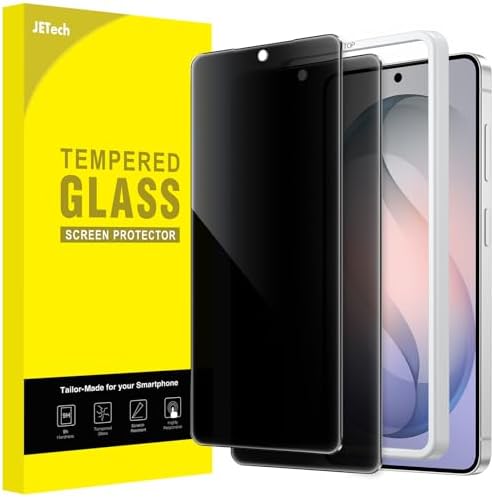
- [Compatibility & Fingerprint Unlocked] Designed for Samsung Galaxy S26. NOTE: Not for Samsung Galaxy S25 / S26+ / S26 Pl…
- [Privacy Protection] Screen is only visible to person directly in front of screen. Protects your personal privacy effect…
- [Easy to Install] The included easy installation tool allows you to align perfectly, and install the screen protector ef…
HKKAIS Privacy Glass – Galaxy S26 Ultra
A Solid Choice for Privacy & Touch Sensitivity
HKKAIS tempered glass is designed for Samsung Galaxy S26 Ultra, offering side-angle privacy and high touchscreen responsiveness. While it doesn’t use liquid adhesive, the standard tempered glass provides easy installation and durable protection for everyday use.
The Privacy Experience:
The HKKAIS protector uses a 2-way side privacy filter. People directly in front of the screen can see clearly, while onlookers are blocked from viewing content. The glossy tempered glass maintains HD clarity. There is minimal brightness reduction. You may need to increase screen brightness slightly when using the privacy layer.
Touch & Biometric Performance:
HKKAIS supports touch-sensitive operation. Fingerprint sensor performance is generally good. Depending on your Galaxy S26 Ultra ultrasonic sensor, a re-scan may be required for optimal unlock speed. Unlike liquid-glue protectors, there is a small air gap, so performance is slightly below native speeds.
Pros:
- Easy Installation: Standard adhesive, bubble-proof, and fits flat screens quickly
- Durable & Scratch-Resistant: 9H tempered glass
- Privacy: Prevents side-view snooping while keeping clear front view
- Case Friendly: Compatible with most phone cases
Cons:
- Minor Brightness Reduction: May need to raise screen brightness slightly
- Slight Fingerprint Tradeoff: Not as perfect as liquid-glue protectors
Who it’s best for:
Everyday users who want privacy and solid protection without complex installation. Ideal for those who value convenience and good fingerprint performance over perfectionist-level optical clarity.

- Designed For Samsung Galaxy S26 Ultra .(Please note that you may need to turn up your display brightness slightly when u…
- Rounded edges glass for comfort on the fingers and hand.
- Resists scratches up to 9H.which forms features of scratch-resistant and shatterproof, protecting your screen.
Newspoint Privacy Flexible TPU Film – Galaxy S26 Ultra
Ultra-Thin Hybrid Privacy Film
Newspoint uses flexible TPU material with Nano Glue technology, prioritizing touch sensitivity and fingerprint reliability over glass rigidity.
Privacy Experience
A 2-way left/right privacy filter blocks side-angle viewing while maintaining clear visibility when viewed head-on. At extreme angles, faint ghosting may appear on bright content.
Fingerprint Performance
Optimized for ultrasonic fingerprint sensors, requiring minimal pressure due to its thin TPU structure.
Pros
- Excellent fingerprint unlock compatibility
- Self-healing TPU recovers minor scratches
- Ultra-thin and lightweight
- Highly case-friendly design
Cons
- Softer surface than glass
- Lower drop protection compared to tempered glass
Best For
Users who prioritize fingerprint accuracy and thinness over impact resistance
![Galaxy S26 Ultra Privacy Screen Protector, [Case Friendly] [Suppo...](https://m.media-amazon.com/images/I/419RWGXWawL._AC_.jpg "Best Privacy Screen Protector for Galaxy S26 Ultra (2026 Reviews)")
- [SUPPORT ULTRASONIC FINGERPRINT] Applied the Nano Glue technology and full adhesive coverage feature allow it an excelle…
- [PRIVACY PROTECTION] 2-Way left and right protect your confidential information from other people at your side and they …
- [ANTI-SCRATCH & SELF-HEALING] 0.18mm thickness with Self-healing properties enable the flexible film to recover from min…
ELEYBTEH Full-Coverage Privacy TPU Film – Galaxy S26 Ultra
Maximum Coverage Privacy Film
This model uses soft TPU film with full-screen coverage, focusing on privacy, flexibility, and smooth touch response.
Privacy Experience
Screen content is visible only within approximately 28 degrees, effectively preventing shoulder surfing in crowded spaces.
Fingerprint Performance
With an ultra-thin 0.15mm profile, the protector maintains high touch accuracy and supports ultrasonic fingerprint unlocking.
Pros
- Strong anti-spy performance
- Self-repairing surface for bubbles & light scratches
- Smooth, resistance-free touch
- Lifetime replacement support
Cons
- Not tempered glass
- More prone to surface marks over time
Best For
Users needing maximum privacy coverage without fingerprint issues
![[3 Pack] For Samsung Galaxy S26 Ultra, 3 Pack Anti-Glare Matte Sc...](https://m.media-amazon.com/images/I/415rcnTADzL._AC_.jpg "Best Privacy Screen Protector for Galaxy S26 Ultra (2026 Reviews)")
- 【3 PACK & COMPATIBLE DEVICE】Exclusively designed for Samsung Galaxy S26 Ultra only. 3 Pack Anti-Glare Matte Screen Prote…
- 【ADVANCED ANTI-GLARE】Featuring cutting-edge anti-glare technology, this high-quality coated surface minimizes reflection…
- 【100% FINGERPRINT ID UNLOCK】Our ultra-thin screen protector is designed to preserve your device’s original touch accurac…
Diacube Matte Screen Protector (Fingerprint-Compatible) – Galaxy S26 Plus
Matte Finish + Touch Accuracy (Non-Privacy Alternative)
Diacube’s matte film is not a privacy protector. Instead, it is included as a functional alternative for users prioritizing glare reduction. It also offers eye comfort.
Viewing Experience
Features anti-glare matte coating and blue-light reduction, improving readability in bright environments without affecting color accuracy.
Fingerprint Performance
Designed for 100% ultrasonic fingerprint compatibility, preserving native touch response.
Pros
- Anti-glare matte surface
- Blue light & UV reduction
- High touch responsiveness
- Multi-pack value
Cons
- No privacy filtering
- Lower hardness than glass
Best For
Users who want fingerprint reliability and glare reduction instead of privacy filtering

- [Self-repairing TPU Film for Samsung Galaxy S26 Ultra]: High-permeability soft acrylic glue to restore the screen color …
- [Upgrade Personal Space ] This Privacy screen protector is only facing the phone directly or within 28 degree can see th…
- [Smooth Touch & Maximum Coverage]: Ultra-thin: 0.15 mm, adjusts to prevent lifting with any case but offer the maximum a…
| User Priority / Use Case | Recommended File Product | Why It’s the Best Fit |
|---|---|---|
| Easiest installation + tempered glass feel | JETech Privacy Tempered Glass | Includes an easy installation tool, 9H tempered glass, and reliable fingerprint support after re-scan. |
| Best fingerprint accuracy (ultrasonic sensor) | Newspoint Privacy TPU Film | Ultra-thin TPU with Nano Glue technology ensures excellent ultrasonic fingerprint responsiveness. |
| Maximum privacy coverage & angle blocking | ELEYBTEH Full-Coverage Privacy TPU Film | Strong anti-spy protection (≈28° visibility), self-healing surface, and full-screen coverage. |
| Anti-glare + eye comfort (non-privacy) | Diacube Matte Screen Protector | Matte finish reduces glare and fingerprints while maintaining excellent touch sensitivity. |
| Balanced privacy + durability for daily use | HKKAIS Privacy Glass | 2-way privacy tempered glass with solid scratch resistance and easy, no-liquid installation. |
🟢 BUYING GUIDE (EDUCATIONAL DEEP DIVE)
How to Choose the Best Privacy Screen Protector for Galaxy S26 Ultra
Choosing the right screen protection for the Galaxy S26 Ultra involves understanding various trade-offs. You need to consider security, display quality, and device functionality. This guide explores the technical aspects you need to consider.

Understanding Micro-Louver Technology
Privacy screen protectors function using a technology called “Micro-Louvers.” Imagine microscopic venetian blinds embedded within the glass layer.
- Head-On View (0°): The louvers are aligned to allow light to pass straight through to your eyes.
- Side View (>30°): The louvers block the light path, making the screen appear black.
- The Trade-off: Even at a 0-degree angle, the physical louvers block a small percentage of light. This is why all privacy protectors will slightly dim your display. On the Galaxy S26 Ultra, you can counter this by disabling “Adaptive Brightness.” Alternatively, you can manually boost the level. However, this increases battery consumption.
The Ultrasonic Fingerprint Challenge
The Galaxy S26 Ultra uses an ultrasonic sensor. This is fundamentally different from the optical sensors found on other Android phones (which use light). Ultrasonic sensors send sound pulses to map the 3D ridges of your fingerprint.
- The Air Gap Issue: Standard screen protectors often have adhesive only on the edges. This creates a tiny air gap between the glass and the screen. Sound waves cannot travel well through air, causing the sensor to fail.
- The Density Issue: Privacy glass is denser than clear glass due to the louver layer. This can dampen the sound waves.
- The Solution: Always look for protectors that use “Full Adhesive” or LOCA (Liquid Optical Clear Adhesive). These ensure a solid medium for sound waves to travel through.
2-Way vs. 4-Way Privacy
- 2-Way (Portrait): Blocks views from the left and right. This is the industry standard. It allows you to share your screen with a friend simply by turning the phone to landscape mode. It offers better light transmission.
- 4-Way (360): Blocks views from top, bottom, left, and right. This is rare and usually expensive. It makes sharing your screen difficult and significantly reduces brightness. We generally recommend 2-way privacy for 90% of users.
Hardness and Durability (Mohs Scale)
Marketing materials often cite “9H Hardness.” This refers to the pencil hardness scale, not the Mohs mineral scale.
- Tempered Glass: Generally sits around 6-7 on the Mohs scale. It resists scratches from keys and coins (copper/nickel) but can be scratched by sand (quartz).
- PET/TPU Film: Much softer. It will “self-heal” minor dents but will scratch permanently if a sharp object drags across it.
- Hybrid Glass: A middle ground. It absorbs impact better than glass (less likely to shatter) but scratches easier than pure tempered glass.
🟢 INSTALLATION MASTERCLASS
Step-by-Step Installation for Flawless Results
The number one reason for negative reviews on screen protectors is user error during installation. Dust and misalignment are the enemies. Follow this protocol to ensure a perfect application on your Galaxy S26 Ultra.

Phase 1: Environment Prep
- Go to the Bathroom: Turn on the hot shower for 5 minutes to create steam. The humidity binds to dust particles in the air, forcing them to settle on the floor. This creates a “clean room” environment.
- Lighting: Ensure you have bright, direct overhead lighting so you can spot specks of dust on the screen.
Phase 2: Cleaning
- Alcohol Wipe: Thoroughly wipe the S26 Ultra screen to remove oils.
- Microfiber Cloth: Dry the screen. Do not use a circular motion; use straight swipes to push dust off the edge.
- Dust Sticker: This is the most important step. Dab the entire surface of the screen with the provided sticky dust removal sticker. Do not skip the corners.
Phase 3: Application (Tray Method)
- Align: Place the alignment tray over the phone. Press it down until it clicks into place.
- Peel: Remove the backing film from the glass.
- Place: Drop the glass into the frame. Do not press yet.
- Swipe: Run your finger down the center of the screen (as indicated in instructions). Watch the adhesive spread.
- Wait: Let the adhesive settle for 30 seconds before removing the tray.
Phase 4: Post-Install Tweaks
- Bubbles: If there are air bubbles, use the provided squeegee card. Push them firmly toward the nearest edge.
- Fingerprints: Go to Settings > Display > Touch Sensitivity and toggle it ON.
- Re-Register: Delete your old fingerprints and register the same thumb twice for better accuracy.
🟢 TROUBLESHOOTING GUIDE
Common Issues and How to Fix Them
Problem: The fingerprint sensor isn’t working.
- Fix: Ensure your fingers are not overly dry (dry skin has poor conductivity). Re-register your prints. Press a little harder than usual. If using UV glue, you may have cured it too quickly; unfortunately, this cannot be reversed without re-installation.
Problem: There are bubbles that won’t go away.
- Fix: If the bubble has a tiny black dot in the center, it is trapped dust. Carefully lift the corner of the glass. Use a sticker to grab the dust speck from the adhesive side. Then, lay it back down. If it is just air (no dot), wait 24 hours. Often, the adhesive needs time to cure. The air will dissipate.
Problem: The screen looks pixelated or has diagonal lines.
- Fix: This is called the “Moiré Effect.” The alignment of the privacy louvers clashes with the pixel grid of the S26 Ultra display. This is a manufacturing defect in lower-quality glass. The only fix is to replace it with a higher-quality brand like JETech or HKKAIS.

FAQs About Galaxy S26 Ultra Privacy Screen Protectors
Does a privacy screen protector reduce brightness on Galaxy S26 Ultra?
Yes. Due to the micro-louver layer required to block side views, light transmission is reduced by approximately 15% to 20%. You will likely need to increase your screen brightness, which can slightly impact battery life.
Will fingerprint unlock work with privacy glass?
It works, but performance varies by brand. Tempered glass requires you to re-register your fingerprints after installation and enable “Touch Sensitivity” in settings. For the best results, UV Liquid Adhesive protectors (like Newspoint ) are recommended.
How often should I replace a Galaxy S26 Ultra screen protector?
You should replace the protector if it cracks, as it loses its structural integrity and ability to absorb shock. Otherwise, replace it every 6 to 9 months when the oleophobic coating wears off and the glass becomes smudge-prone.
Is privacy glass safe for OLED displays?
Yes. Privacy protectors are purely optical filters and do not damage the organic LEDs of the Galaxy S26 Ultra. They do not cause burn-in or heat retention issues.
Can I use a privacy screen protector with a case?
Most premium protectors are “Case Friendly,” meaning they leave a small gap (approx. 1mm) around the edge. However, extremely bulky rugged cases with high lips might push against the edges of the glass, causing lifting.
Final Verdict – Best Privacy Screen Protector for Galaxy S26 Ultra
Best Overall:
JETech Privacy Tempered Glass is the best all-around privacy screen protector for the Galaxy S26 Ultra. It combines easy alignment installation, 9H tempered glass durability, clear front-view privacy, and reliable ultrasonic fingerprint support after re-registration. This makes it the safest recommendation for most users.
Best for Privacy + Touch Sensitivity:
HKKAIS Privacy Glass offers effective 2-way side-angle privacy while maintaining good touch responsiveness and fingerprint performance. It installs easily using standard adhesive and is ideal for users who want strong privacy without complex installation methods.
Best Budget Option:
Newspoint Privacy TPU Film is the most affordable choice. Its ultra-thin TPU design supports ultrasonic fingerprint unlocking extremely well and provides basic side-view privacy, making it suitable for users who prioritize touch accuracy and price over glass-level impact protection.


