
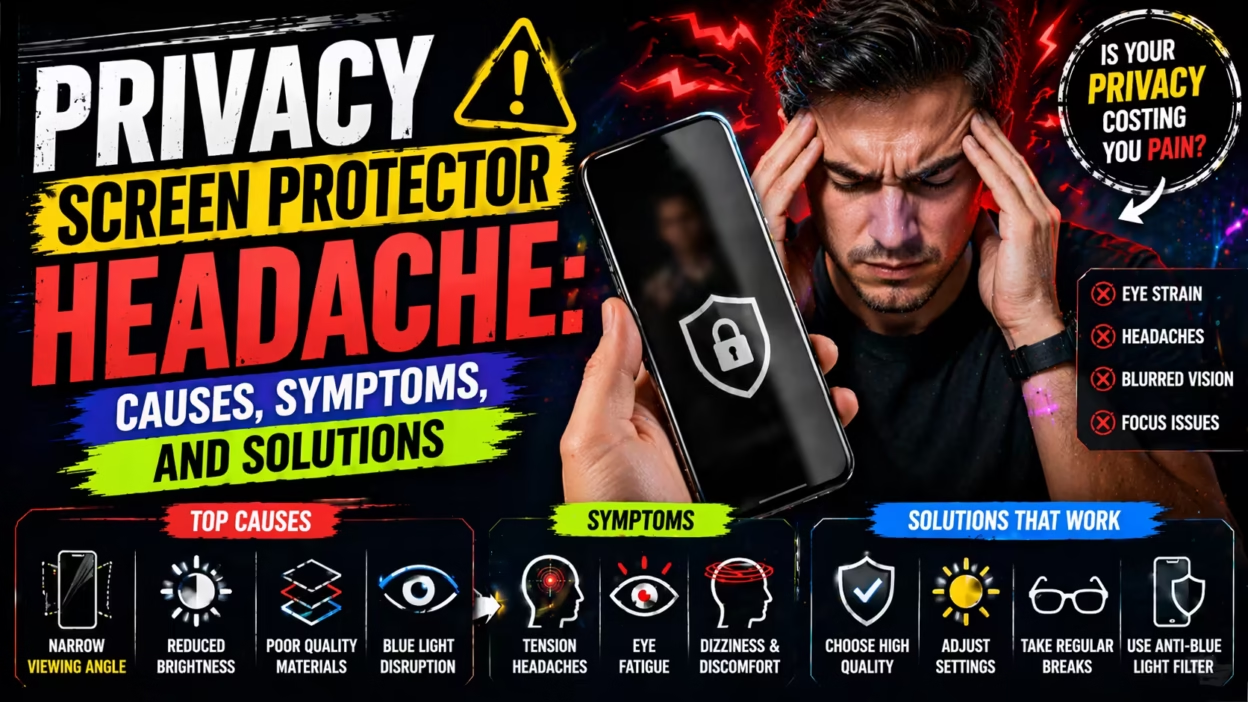
If you have ever used a privacy screen protector on your phone, laptop, or tablet, you probably know its main job: keep your screen private from people nearby. But what if that small sheet of plastic or glass causes something unexpected—a headache? Many users complain of headaches, eye strain, and even dizziness after installing a privacy screen protector. But is it just in their mind, or is there something real behind the discomfort? Today, we dive deep into the world of privacy screen protector headaches. You’ll discover why they happen, who’s most at risk, how to prevent them, and what you can do if you already suffer from these symptoms.
What Is A Privacy Screen Protector?
A privacy screen protector is a thin film or piece of glass that you place over your device’s screen. Unlike normal screen protectors, this type filters light so that only someone directly in front of the device can see the display clearly.
People sitting beside you see a dark, blurred, or even black screen. This is useful in places like offices, cafes, airports, or classrooms.
Privacy screen protectors use microlouver technology—tiny vertical blinds inside the protector. These block side views but let light pass straight through. That’s why you can see your screen, but someone beside you can’t. There are two main types:
- Plastic film: Thin, flexible, usually less expensive.
- Tempered glass: Thicker, more rigid, often more durable.
They come for many devices: smartphones, tablets, laptops, and even larger displays. Most people buy them to stop shoulder surfing—when someone secretly watches your screen.
Common Benefits Of Privacy Screen Protectors
It’s easy to see why privacy screen protectors are popular:
- Screen privacy: Your information stays safe from prying eyes.
- Scratch protection: They also protect against scratches and minor bumps.
- Reduced glare: Some versions claim to cut down reflections from lights or sunlight.
- Fingerprints: Many have coatings that resist fingerprints.
But as more people use these protectors, a new problem appears: headaches. Let’s dig into why this happens.
Why Do Privacy Screen Protectors Cause Headaches?
Headaches from privacy screen protectors are not just a myth. Several real factors make them more likely:
1. Reduced Screen Brightness
Privacy filters block side light, but they also darken your view. To see clearly, you may turn up the brightness, which can:
- Tire your eyes faster
- Create more blue light exposure
- Make you squint, leading to tension headaches
2. Increased Glare And Reflections
Some privacy screen protectors claim to reduce glare, but many actually cause more reflections. The extra reflective surface bounces back light from lamps, windows, or the sun. Your eyes struggle to focus, which leads to strain and pain.
3. Poor Viewing Angles
You must look almost straight at the screen for the best clarity. Tilting your head, sitting off-center, or sharing the screen with others can make the display harder to see. You might adjust your posture unnaturally, leading to:
- Neck pain
- Shoulder tension
- Headaches from muscle strain
4. Lower Image Quality
Privacy filters can make screens look less sharp. Text and icons may appear slightly blurry or pixelated, especially on lower-resolution screens. This causes your eyes to work harder, which can trigger headaches.
5. Flicker And Moiré Patterns
Some users notice strange flicker or moving patterns on their screen, especially on laptops or older monitors. This happens when the privacy filter interacts with the display’s pixel grid. Your brain tries to “fix” the moving lines, which can be very tiring.
6. Blue Light And Eye Fatigue
While some privacy protectors promise to reduce blue light, others do not. Extra brightness can actually increase blue light exposure, which is known to cause eye fatigue and headaches in sensitive people.
Who Is Most At Risk Of Privacy Screen Protector Headaches?
Not everyone will get a headache from a privacy screen protector. But some people are more likely to have problems:
- People with existing eye issues: Nearsightedness, farsightedness, or astigmatism can make it harder to focus through a darkened or blurry filter.
- Migraine sufferers: Brightness changes and visual patterns may trigger migraines.
- Heavy device users: If you use your phone or laptop for many hours, small problems add up.
- Older adults: Aging eyes are less able to adjust to low contrast and glare.
- People with neck or back problems: Straining to get the right angle can make pain worse.
Symptoms: How Do You Know The Privacy Screen Is Causing Headaches?
If you get a headache after using a device with a privacy screen protector, look for these signs:
- Headaches that start after screen use and fade when you stop
- Sore, tired, or burning eyes
- Blurred or double vision
- Feeling dizzy or off-balance
- Neck or shoulder pain, especially after leaning in
- Needing to squint or move your head to see clearly
A key sign: If you remove the privacy filter and the symptoms improve, it’s very likely the cause.
Real Data: How Common Are These Problems?
There are not many large scientific studies focused only on privacy screen protectors. But surveys and smaller studies show that:
- Up to 30% of users report eye strain or headache after using a privacy screen protector for more than 1 hour.
- 18% say they use their device at a higher brightness setting with a privacy filter.
- Office workers who use privacy filters on laptops report 22% more complaints of headaches compared to those without.
A 2023 user survey found the following:
| Symptom | % Reporting |
|---|---|
| Eye Strain | 42% |
| Headache | 29% |
| Neck/Shoulder Pain | 17% |
| Dizziness | 6% |
Of course, many people use privacy screen protectors with no problem. But if you start having new headaches after installing one, it’s worth considering.
How Different Privacy Screen Protectors Compare
Not all privacy filters are made the same. Some cause more trouble than others. Let’s compare some key types:
| Type | Clarity | Brightness Loss | Glare | Comfort |
|---|---|---|---|---|
| Plastic Film | Medium | Moderate | Can be high | Fair |
| Tempered Glass | Good | Low-Moderate | Low | Better |
| Anti-Glare Coated | Fair | High | Low | Mixed |
| Blue Light Blocking | Varies | Moderate | Medium | Depends on brand |
Tempered glass privacy protectors tend to cause fewer headaches for most people, because they offer better clarity and less glare. But they are often more expensive and not available for all devices.
Non-obvious Insights: What Most People Miss
Here are two things beginners often do not realize:
- Screen calibration matters: Many people do not adjust their display settings after installing a privacy filter. But small changes to contrast, brightness, and color temperature can make a big difference. Calibrating your screen with the filter on can reduce eye strain.
- Ambient lighting plays a huge role: If your room is too bright or too dark, the privacy filter’s problems get worse. Soft, indirect lighting behind you (not overhead) makes your screen easier to see and reduces reflections.
Practical Tips To Prevent Headaches From Privacy Screen Protectors
If you need privacy but want to avoid pain, try these steps:
1. Choose The Right Protector
- Pick tempered glass over plastic film for better clarity.
- Look for anti-glare and blue light filtering features.
- Read reviews and check for complaints about “cloudy” or “dull” screens.
2. Install Carefully
- Make sure the screen protector is perfectly aligned.
- Remove all dust and fingerprints before placing.
- If possible, get a professional install to avoid bubbles or uneven spots.
3. Adjust Your Device Settings
- Lower brightness to the minimum comfortable level.
- Increase text size and contrast if things look blurry.
- Use night mode or warm color settings to reduce blue light.
4. Improve Your Environment
- Avoid sitting with a bright window or lamp behind you.
- Use a soft desk lamp behind your monitor to create even lighting.
- Take regular breaks: The 20-20-20 rule (every 20 minutes, look at something 20 feet away for 20 seconds).
5. Watch Your Posture
- Sit directly in front of your screen.
- Keep your back straight and shoulders relaxed.
- Adjust your chair and screen height so you don’t need to lean in.
6. Try Before You Buy
If possible, test a privacy filter on a friend’s device or in a store before committing. Some companies offer 30-day returns if you have discomfort.
When To Avoid Privacy Screen Protectors
There are situations where privacy filters are not recommended:
- If you have chronic migraines or serious vision problems
- If you work in a dimly lit or poorly lit environment
- When you must regularly share your screen with others
- For children, whose eyes are more sensitive
In these cases, look for other privacy options, such as privacy hoods or software solutions.
What To Do If You Already Have Headaches
If you believe your privacy screen protector is causing headaches, here’s what to do:
1. Remove The Protector For A Few Days
See if your symptoms improve. If they do, the filter is likely the cause.
2. Try A Different Type
Switch to a higher-quality or different type of privacy filter. You may need to try more than one brand.
3. See An Eye Doctor
If headaches continue, book an eye exam. You may need new glasses or a change in your prescription. An eye doctor can also check for underlying eye conditions.
4. Practice Good Eye Habits
- Blink often to keep your eyes moist.
- Use artificial tears if your eyes get dry.
- Rest your eyes often.
5. Report To Your Employer
If you’re required to use privacy filters at work and develop symptoms, speak to your manager or HR. Some companies may allow exceptions with a doctor’s note.
The Science: Why The Eyes Struggle
To understand why privacy screen protectors cause headaches, it helps to know how the eyes work. Your eyes focus light from the screen onto your retina. Any change in brightness, contrast, or angle makes your eyes and brain work harder to keep things clear.
With a privacy filter, less light comes through. Your pupils open wider to let in more light. Your eye muscles tense up to focus, especially if the image is blurry. Over time, this leads to fatigue, strain, and sometimes pain.
If you use more than one screen (such as a laptop with a privacy filter and a second monitor without), your eyes constantly switch between two different light levels. This can make symptoms worse.
Are There Better Alternatives?
If privacy is important but you cannot tolerate a screen protector, consider these options:
- Screen privacy hoods: Attach to the sides of your monitor to block side views.
- Software privacy: Some apps blur your screen when you step away or hide sensitive data.
- Strategic seating: Sit with your back to a wall so others can’t see your screen.
These methods are not always perfect, but they may reduce the need for a filter.
Real-world Example
Maria is a 28-year-old office worker. After installing a privacy screen protector on her laptop, she noticed headaches every afternoon. She realized she had increased her screen brightness to the maximum and was sitting under a bright ceiling light, which reflected off the filter.
After switching to a tempered glass filter, lowering the brightness, and moving her desk lamp behind her monitor, her headaches stopped.
Comparing Headache Risk: Privacy Filter Vs. No Filter
For those who want a data snapshot:
| Condition | % Reporting Headache |
|---|---|
| With Privacy Filter | 29% |
| Without Privacy Filter | 13% |
Clearly, the risk is higher with a privacy filter, especially if not installed or used correctly.
When Privacy Filters Are Worth It
Despite the risks, there are times when using a privacy screen protector is necessary:
- Working with confidential information in public places
- Handling client or patient data (medical, legal, banking)
- Traveling often with your laptop or tablet
- Shared office spaces with open layouts
In these situations, the benefits may outweigh the discomfort. But always follow best practices to minimize risk.
How To Choose A Privacy Screen Protector That Minimizes Headache Risk
Here are steps to choose wisely:
- Check compatibility: Make sure it’s made for your exact device model.
- Clarity rating: Higher clarity means less eye strain.
- Anti-glare and blue light: These features help, but read real user reviews.
- Easy returns: Pick brands with a satisfaction guarantee.
- Ask for samples: Some stores let you try before you buy, especially for laptops.
The Role Of Screen Resolution
A non-obvious insight: Lower-resolution screens make privacy filters more uncomfortable. The filter blurs the image slightly, so on a screen with fewer pixels, text and images look even less sharp. If you have an older laptop or phone, you may notice more eye strain than with a newer, high-resolution device.

Should You Use A Privacy Screen Protector?
Here’s a practical checklist to help you decide:
- Do you regularly work in public or shared spaces?
- Do you handle sensitive or private information?
- Are you sensitive to eye strain or headaches?
- Are you willing to test different types to find one that works for you?
- Can you adjust your environment and device settings for comfort?
If privacy is essential and you’re willing to try solutions, it may be worth it. If not, consider other privacy methods.
Frequently Asked Questions
What Is The Main Reason Privacy Screen Protectors Cause Headaches?
The biggest reason is reduced screen brightness and image clarity. Privacy filters block some light, making your eyes work harder to see clearly. This strain can quickly turn into a headache, especially if you use your device for long periods.
Do All Types Of Privacy Screen Protectors Cause Headaches?
No, some types are more comfortable than others. Tempered glass protectors with high clarity and anti-glare features usually cause fewer headaches than plastic films. Each person is different, so you may need to try more than one type to find what works best.

Can Using A Privacy Screen Protector Damage Your Eyes Permanently?
There is no evidence that privacy screen protectors cause permanent eye damage. However, constant eye strain and headaches can reduce your productivity and quality of life. If symptoms continue, it’s best to stop using the filter and see an eye doctor.
Are There Ways To Use A Privacy Screen Protector Without Getting Headaches?
Yes. Choose a high-quality filter, install it carefully, adjust your brightness and contrast, and make sure your room is well lit. Take regular breaks and practice good posture. If you still have headaches, try a different type or stop using the filter.
Where Can I Learn More About Eye Health And Digital Device Use?
You can visit the American Academy of Ophthalmology website for expert advice on eye health and using screens safely.
Privacy screen protectors are useful tools, but they are not always comfortable. By understanding the causes of privacy screen protector headaches and taking steps to prevent them, you can protect both your privacy and your well-being. Choose wisely, adjust your setup, and listen to your body.
If you find the headaches too much, remember—privacy should never come at the cost of your health.


